Start with a phrase and set the filters
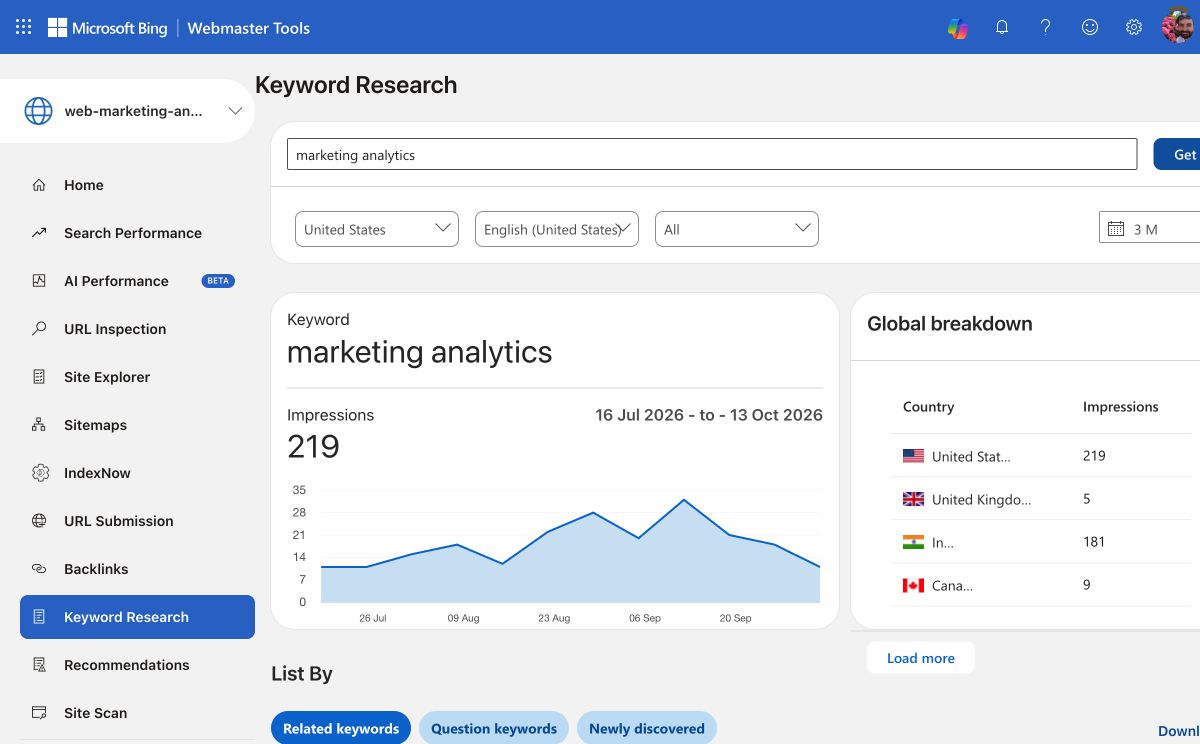
Open Keyword Research in Bing Webmaster Tools, enter a phrase, and select Get details. The screenshot below shows ‘marketing analytics’ with United States and English (United States) selected for a three-month period. Bing displays a trend chart and an Impressions figure for the phrase. This is research data for the keyword, not the number of impressions earned by this website.
Choose the market and language that match your audience. Bing says the tool can filter by country, language, and device, and inspect any timeframe within the last six months. Its default view uses all countries, languages, and devices over the previous three months. Save the filter settings and extraction date with any keyword ideas you keep.
Explore related, question, and newly discovered keywords
Related keywords suggests terms Bing considers relevant to your root phrase. Question keywords shows questions people asked around those ideas. Newly discovered is a subset of related terms that became relevant to the root phrase in the past 30 days. Bing explicitly says this does not mean people started searching those terms only in that period.
Use the lists as starting points. Group similar questions, open the results for a promising phrase, and decide whether an existing page already meets the need. A high count is not enough reason to publish: the phrase must fit your audience and your expertise.
Inspect the ranking URLs
The tool also lists the top 10 URLs that appear in Bing's results for the root keyword, with topics Bing associates with those pages. This helps you see the kind of answer currently shown: a definition, tutorial, comparison, or product page. A relevant topic can become another root phrase for research.
Look for a reader question you can answer more clearly or with better evidence. Bing advises creators to focus on their area of expertise instead of chasing every popular term.
Interpret the figures and check the result
The interface labels its main figure Impressions, while Bing's help describes keyword search volume and trends. Treat it as a Bing-specific demand signal under your chosen filters. It is not Google search volume, your site's Search Performance impressions, expected clicks, or a traffic promise.
The Global breakdown card may still show other countries after you select a country filter. Bing's documentation says the country filter does not apply to that card. After publishing or updating a page, use Search Performance to measure the site's own Bing impressions, clicks, and queries, and track useful outcomes on the site. Keep those results separate from the research figures.
Sources: Bing Webmaster Tools: Keyword Research filters and results · Bing Webmaster Tools: Search Performance help